

Standard Error Calculator
The standard error of the mean is the standard deviation divided by the square root of the sample size: SE = SD / √n. Enter your values below to get the standard error with full step-by-step working. Three modes are available depending on what data you have.
The standard error formula is SE = SD / √n, where SD is the standard deviation and n is the sample size. For example, with an SD of 14.2 and a sample of 100, the standard error is 14.2 / 10 = 1.42. This calculator works from the SD and sample size, or from a raw data set. It also handles the standard error of a proportion.
Just enter the sample size (n) and standard deviation (SD) or your raw data, and the calculator automatically computes the standard error, variance, and other useful statistical values.
How to Use the Standard Error Calculator
- Enter your data values, sample size, or standard deviation.
- Click Calculate Standard Error.
- You get:
- Standard Error (SE)
- Standard Deviation
- Sample Size (n)
- Variance
- Mean (if data is entered)
What Is Standard Error?
Standard error (SE) measures how much a sample mean varies from the true population mean. A smaller SE means your sample mean is a more accurate estimate; a larger SE means more variability or a smaller sample size. To work out how many responses you need before collecting data, the sample size calculator finds the minimum sample for your target margin of error. To picture what a shrinking SE does to the shape itself, see how the sampling distribution narrows.
It is used in:
- Statistics
- Research papers
- Data analysis
- Confidence intervals
- Hypothesis testing
What Does SEM Mean in Statistics?
SEM stands for standard error of the mean. It is the same thing as the standard error you calculate with SE = SD / √n. The abbreviation SEM is common in biology, medicine, and psychology papers, where results are often written as “mean ± SEM” to show how precisely the mean was measured.
The SEM formula is identical to the standard error formula:
SEM formula: SEM = SD ÷ √n
So if you see “SEM” in a textbook or research paper, treat it exactly like standard error. A mean of 25 written as “25 ± 1.4 SEM” tells you the sample mean is 25 and the standard error is 1.4.
What Is 2 SEM and How Do You Calculate It?
2 SEM is simply twice the standard error of the mean: 2 SEM = 2 × (SD / √n). It is used as a quick rule of thumb for a roughly 95% confidence range, because about 95% of sample means fall within two standard errors of the true mean.
Example. If your standard error is 1.42, then 2 SEM = 2 × 1.42 = 2.84. So you would expect the true mean to sit within about 2.84 units of your sample mean, either side. Researchers plot this as error bars on graphs, where the bar length equals 1 SEM or 2 SEM depending on what they are showing.
Standard Error of a Proportion
When your data is a count of successes rather than measurements, use .
Say 42 people out of 50 said yes in a survey. The proportion p is 42 / 50 = 0.84. Then SE = √(0.84 × 0.16 / 50) = 0.0518.
This version is used in polling, A/B testing, and survey reporting. The standard error is largest when p is near 0.5, which is why a 50-50 split needs a bigger sample to measure precisely.
Formula for Standard Error
The formula for calculating SE of the mean is:
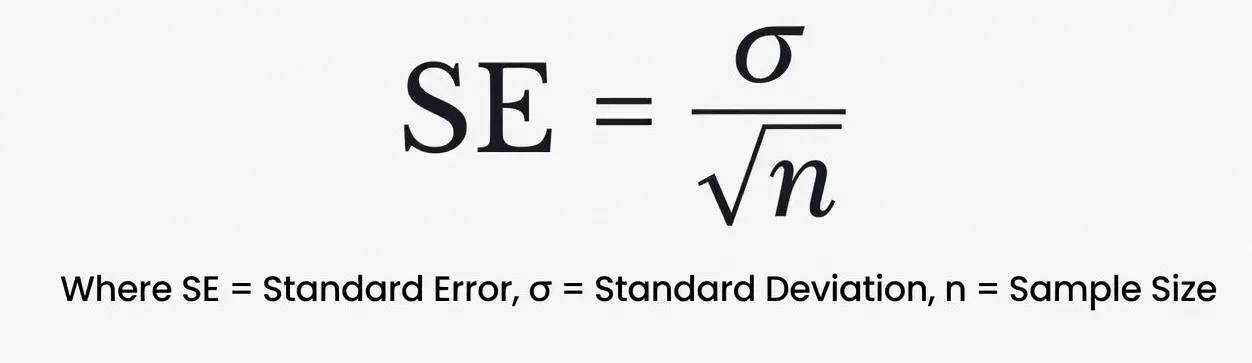
Where:
- SD = Standard Deviation
- n = Sample Size
For the standard error of a proportion, the formula is , where p is the sample proportion.
The calculator applies this formula automatically.
Standard Error vs Standard Deviation
| Standard Deviation (SD) | Standard Error (SE) |
|---|---|
| Measures spread in data | Measures accuracy of mean |
| Describes entire sample | Describes precision of estimate |
| Does not depend on sample size | Gets smaller as sample size increases |
How Do You Convert Standard Error to Standard Deviation?
To convert standard error back to standard deviation, multiply the standard error by the square root of the sample size: SD = SE × √n. This reverses the standard error formula. If a study reports a standard error of 1.42 from a sample of 100, the standard deviation is 1.42 × 10 = 14.2.
Research papers often report the standard error instead of the standard deviation, so you frequently need to work backwards. The two conversions are simple mirror images of each other:
Standard deviation from standard error: SD = SE × √n
Standard error from standard deviation: SE = SD ÷ √n
Worked example. A paper reports a mean of 68 with a standard error of 0.5, based on 36 participants. The square root of 36 is 6, so the standard deviation is 0.5 × 6 = 3.0. Going the other way, if you knew the SD was 3.0, then SE = 3.0 ÷ 6 = 0.5. Same numbers, opposite direction.
Standard Error to Standard Deviation Table
Quick reference for common standard error and sample size pairs. Multiply SE by √n to get SD.
| Standard error (SE) | Sample size (n) | √n | Standard deviation (SD) |
|---|---|---|---|
| 0.5 | 25 | 5 | 2.5 |
| 0.5 | 100 | 10 | 5.0 |
| 1.0 | 16 | 4 | 4.0 |
| 1.42 | 100 | 10 | 14.2 |
| 2.0 | 36 | 6 | 12.0 |
| 2.5 | 64 | 8 | 20.0 |
| 3.0 | 9 | 3 | 9.0 |
One thing to watch: the standard deviation stays the same no matter how big your sample is, but the standard error shrinks as n grows. That is why a large study can report a tiny standard error even when the underlying data is quite spread out.
Why Standard Error Matters
Standard error helps you understand:
- Accuracy of your sample mean
- How confident you can be in your results
- Whether differences between groups are significant
- Variability in repeated measurements
- Margins of error
A low SE indicates reliable data. A high SE means more uncertainty.
Why Use This Standard Error Calculator?
✔
✔ Works with raw data or summary values
✔ Ideal for students, researchers & analysts
✔ Gives additional stats for better interpretation
✔ Free, unlimited use
✔ Mobile-friendly and easy to use
How to Calculate Standard Error?
There are two main ways:
1. Using Raw Data Values
- Find the mean
- Calculate the standard deviation (SD)
- Divide SD by the square root of sample size
Worked Example: Standard Error of a Data Set
Find the standard error for the data set 1.76, 1.90, 2.40, 1.98.
- Add the values: 1.76 + 1.90 + 2.40 + 1.98 = 8.04. Divide by 4 to get the mean = 2.01.
- Find each squared deviation from the mean, add them up: 0.0625 + 0.0121 + 0.1521 + 0.0009 = 0.2276.
- Divide by n − 1 (that is 3) to get the variance = 0.0759, then take the square root for the sample standard deviation = 0.2754.
- Divide by √4 = 2: SE = 0.2754 / 2 = 0.1377.
So the standard error of the mean for this data set is 0.1377. Paste the same four numbers into the calculator above using the raw data mode to check every step.
2. Using Summary Data
If you already know SD and sample size:
Just apply the formula: SE = SD / √n
The calculator on this page handles both.
How the Standard Error Calculator Works
You can calculate SE in two ways:
1. Enter Raw Data
Paste numbers separated by commas or spaces.
Example:12, 15, 14, 18, 11, 19
The tool automatically computes:
- Mean
- Standard deviation
- Sample size
- Standard error (SE)
2. Enter Summary Values
Input:
- Standard deviation (SD)
- Sample size (n)
The tool returns:
- Standard error of the mean
This suits:
- Research papers
- Assignments
- Statistics projects
- Survey analysis
How to Calculate Standard Error in Excel
You can calculate SE in Excel using simple formulas.
Method 1: From Raw Data
Use: =STDEV.S(A1:A10) / SQRT(COUNT(A1:A10))
Method 2: From SD and Sample Size
If SD is in B1 and n in B2: =B1 / SQRT(B2)
For Google Sheets the formulas are identical. If your data is in A1 to A10, use =STDEV.S(A1:A10)/SQRT(COUNT(A1:A10)) for the sample standard error. One common mistake is using STDEV.P when your data is a sample rather than the whole population, which gives a slightly smaller standard error than it should. It is the same sample-versus-population trap that catches people using VAR.S and VAR.P, and it comes from the same n minus 1 divisor.
Try these next
Frequently Asked Questions (FAQs)
How to calculate standard error?
To calculate the standard error (SE), divide the standard deviation (SD) by the square root of the sample size (n).Formula: SE = SD / √n.If you have raw data, first compute the mean, then the standard deviation, and finally apply the formula.
How to calculate standard error in Excel?
In Excel, you can calculate standard error using:=STDEV.S(range)/SQRT(COUNT(range)) → sample standard error=STDEV.P(range)/SQRT(COUNT(range)) → population standard error
You can also use your dataset directly with these formulas.
How to calculate standard errors?
Standard errors are calculated by dividing a statistical measure’s standard deviation by the square root of its sample size. The most common is the standard error of the mean, but regression and proportion standard errors follow similar principles.
How is standard error calculated?
Standard error is calculated by measuring how much a sample mean deviates from the true population mean.
The basic calculation is:SE = Standard Deviation / √Sample SizeA larger sample size reduces the standard error, meaning the estimate becomes more reliable.